Are you wondering how to renew your DEMAT account in Nepal before the deadline? Don’t worry! This complete guide will help you go through the renewal process smoothly and on time.
A DEMAT (Dematerialized) account is essential for trading shares in the Nepal Stock Exchange (NEPSE). As per regulations, all DEMAT accounts must be renewed every fiscal year before Ashadh end (mid-July). Failing to do so will result in the account being suspended or frozen, meaning you can’t buy or sell shares until it’s renewed. Let’s walk through the step-by-step process.
Documents Required for DEMAT Account Renewal
Before you begin, make sure to keep the following details ready. These are generally required if you plan to renew your DEMAT account through digital wallet apps or by visiting the office for offline renewal:
- Your BOID number (16-digit)
- The mobile number linked to your account
- Digital Wallet or Online Banking (for payment)
- Valid Citizenship or ID (only if offline renewal is needed)
Step-by-Step Guide to Renew Your DEMAT Account And Mero Share in Nepal
Step 1: Know Your Depository Participant (DP)
Your DP is the institution where your DEMAT account was opened. It could be:
- A commercial bank
- Capital market company
- Merchant bank or broker
Check their official website or contact them directly.
Step 2: Online Renewal Process
Using the online renewal method, you can easily renew your DEMAT and MeroShare accounts either through digital wallet apps like eSewa, Khalti, or IME Pay, or directly through the MeroShare dashboard.
Option A: Using Digital Wallet (eSewa, Khalti, IME Pay)
- Open your digital wallet app (e.g., eSewa).
- Go to Finance > Capital Market > DEMAT Renewal.
- Select your DP (Depository Participant).
- Enter your 16-digit BOID.
- Pay the renewal fee (NPR 100).
- You will receive a confirmation SMS or email.
Option B: Through DP’s Online Portal
- Visit the website of your DP (e.g., Nabil Invest, NIC Asia Capital, etc.).
- Look for the DEMAT Renewal section.
- Log in using your BOID or CRN number.
- Make payment via online banking or wallet.
- Save the receipt for future reference.
Step 3: Offline Renewal (if needed)
- Visit your DP’s office.
- Fill out a DEMAT renewal form.
- Provide your BOID number and identification.
- Pay the fee at the counter.
- Collect the payment receipt.
Step-by-Step Process to Renew DEMAT And Mero Share Account via MeroShare
Step 1: Visit the MeroShare Website
- Go to: https://meroshare.cdsc.com.np
- Choose your Depository Participant (DP) from the dropdown menu.
- Log in using your username and password.
Step 2: Navigate to “Profile”
- Once logged in, go to the Right-hand Top Corner.
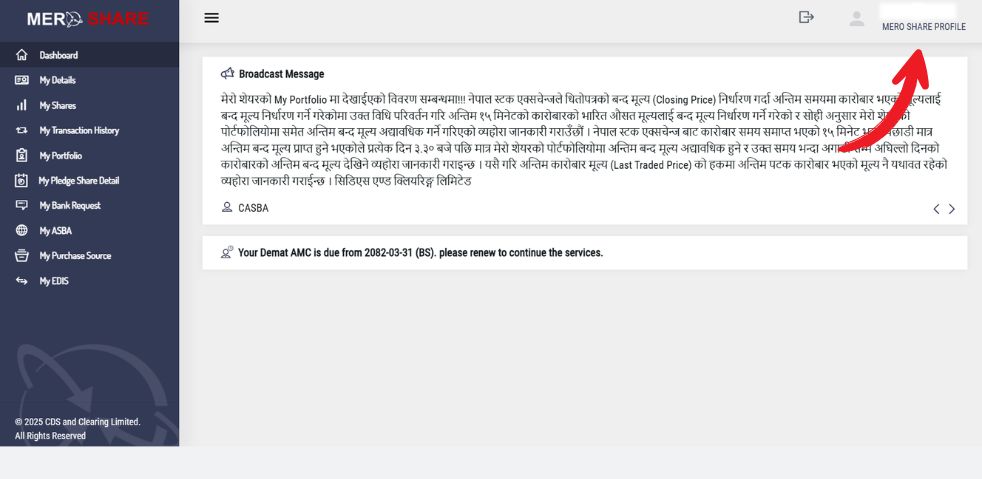
- You will be redirected to the “Own Profile” page. Then, click on the “Renew Account” option.
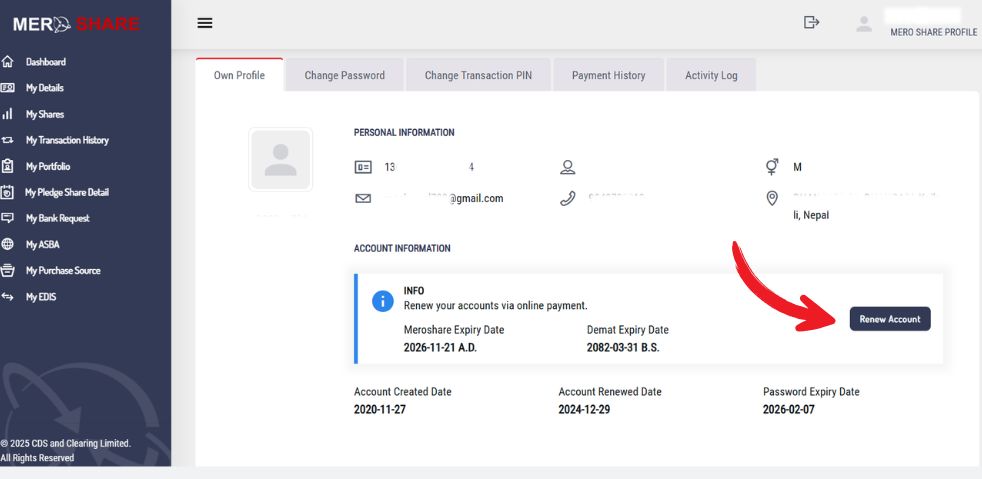
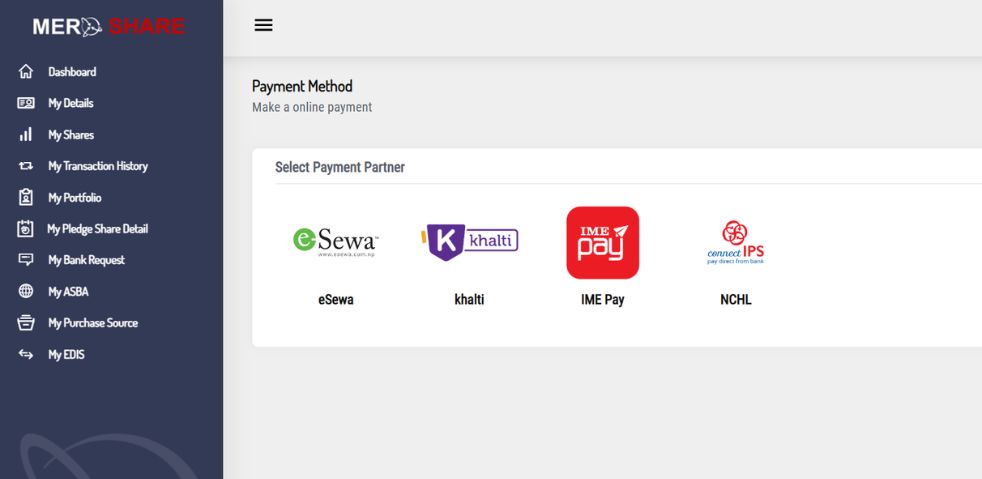
Step 3: Select Payment Method
- You will be prompted to choose a payment method:
- eSewa
- Khalti
- ConnectIPS
- eSewa
- Select your preferred method. Let’s select ConnectIPS as the payment method. After selecting it, a new window will appear with three renewal options:
Step 4: Select the Account to Renew
From the three available options listed below, select the one you wish to renew.
- Both MeroShare and DEMAT
- DEMAT account only
- MeroShare only
For full renewal, choose the first option: Both MeroShare and DEMAT. Next, choose the number of years you want to renew. You can select up to 10 years, but for this guide, we’ll select 1 year.
The total renewal fee will usually be NPR 150 (NPR 100 for DEMAT + NPR 50 for MeroShare). Click the “Proceed” button to move forward.

Step 5: Complete the Payment
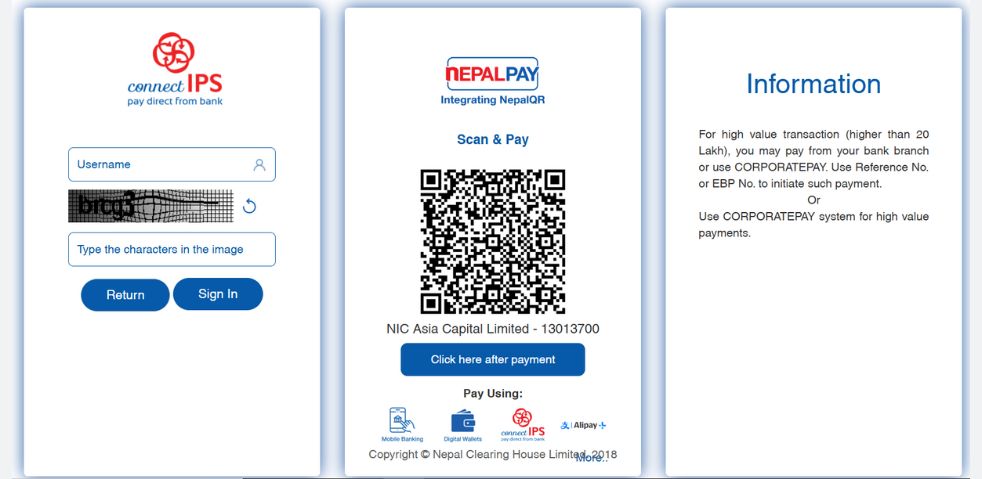
After clicking proceed, a payment window will open. Where you will have two options to complete the payment:
- Scan the QR Code provided and pay directly through your mobile banking or digital wallet.
- Or, log in to your ConnectIPS account by entering your username and password.
Once logged in, confirm the transaction and complete the payment process. After successful payment, your DEMAT and MeroShare accounts will be renewed instantly.
What Happens If You Don’t Renew?
- You won’t be able to buy or sell shares.
- Dividends and bonus shares may be delayed.
- Additional charges may apply upon late renewal.
Final Thoughts
Renewing your DEMAT account in Nepal is a simple yet essential task that ensures uninterrupted access to your shares and investment activities. Whether you prefer digital wallets or visiting the branch, following the steps above will help you complete the process in just a few minutes.
Don’t wait until the last minute – renew your DEMAT account today!
FAQs on DEMAT Account Renewal
Q1: How much is the DEMAT renewal fee?
Usually NPR 100 per year.
Q2: Can I renew my DEMAT account through eSewa or Khalti?
Yes, most DPs accept renewal payments through these wallets.
Q3: What is a BOID number?
BOID (Beneficiary Owner Identification) is your 16-digit unique DEMAT account number.
Q4: What happens if I miss the renewal deadline?
Your account will be suspended, and trading will be restricted until renewal.
Q5: What is DEMAT Account Renewal?
DEMAT account renewal is an annual maintenance process where you pay a small fee (usually NPR 100) to your Depository Participant (DP), such as banks, brokers, or merchant banks. This fee ensures your account stays active for the next fiscal year.